
JobBag + Weel API Upload Process
This guide walks you through the WEEL to JobBag process using the WEEL API, from adding the Job Number and Kind to each transaction in WEEL through to downloading transactions, creating payments and reconciling the WEEL bank account. It also covers what to check when a transaction can’t be processed and how to fix the issue so the payment can be created.
Step 1. Cardholders Add Job Information in Weel
Before downloading, cardholders must enter the Job Number and Kind into each Weel transaction.
You need to set up and use custom fields for the Job Number and Kind.
Step 2. Download Transactions into JobBag
Go to: Accounts > WEEL > Select Key:Weel > Download

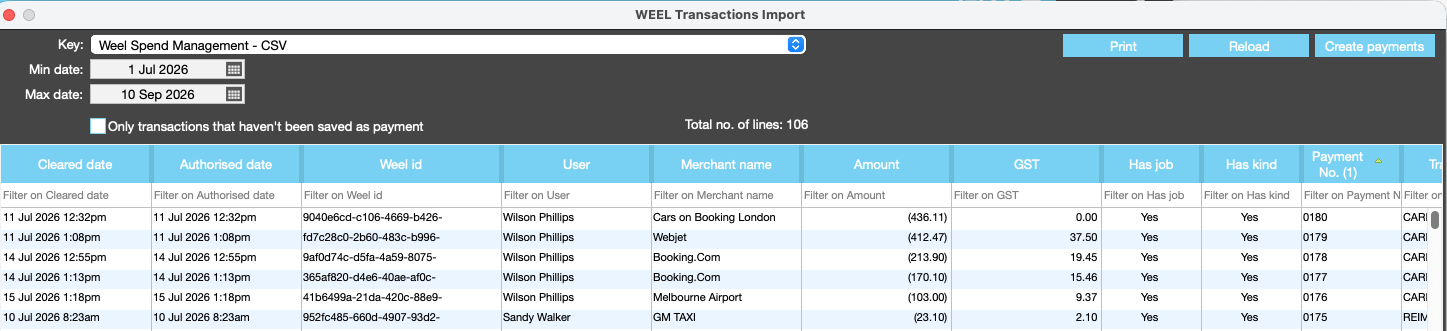
Review Transactions
- Downloaded transactions appear in the WEEL window
- The Job and Kind columns will show YES if valid, or NO if missing
- Payments can only be created when both the Has job and Has kind fields show YES
- If you need to update or fix a transaction go back into weel to update the transaction then run the download process again repeat this until the Has job and Had kind colums show yes
- You can Right click > Set columns to configure the Weel Transaction import window
⚠️ Note: Payments can only be created when both Job and Kind are present and valid.

Step 3. Create Payments
Click Create Payments ( Top Right) to initiate processing for valid transactions.

Once the payment is created the payment number will appear in the Payment No column
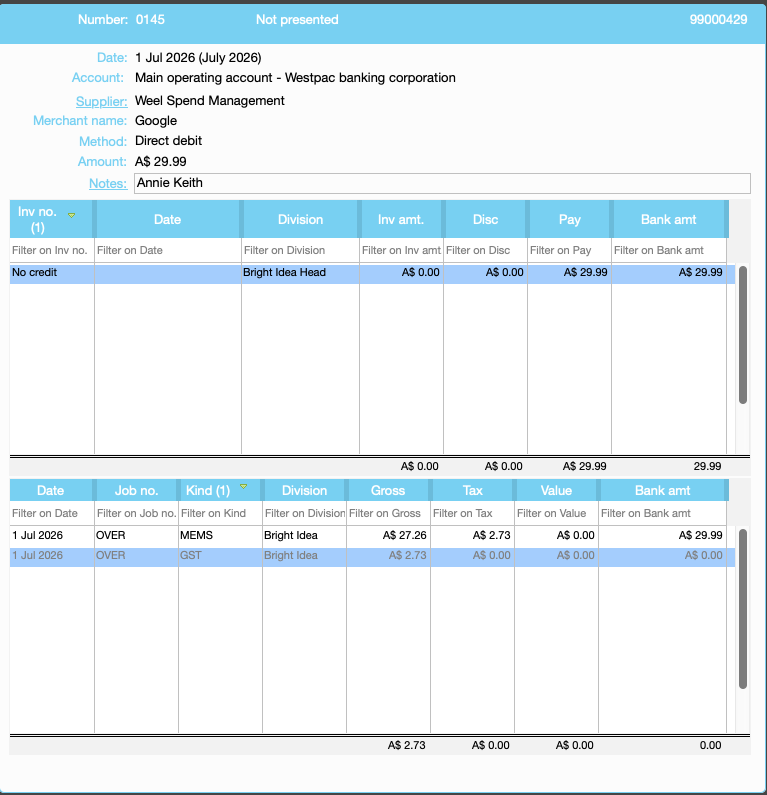
Payments are created using the Weel supplier and can be found in the browse payments window
Step 4. Reconcile the Weel Bank Account
- Go to:
Accounts > Bank Reconciliation > Weel Bank - Import the bank statement.
- Matched transactions will automatically turn green.

Note: Transactions which have both the Job and Kind will auto match
❗ Error Handling
If a payment can't be created, JobBag will display a message identifying the issue:
Common Errors:
- No job for WEEL ID - Job number field is missing; it needs to be added in WEEL by the cardholder
- No job for WEEL ID - Check the status of the job; If the job is dead make it live again!
- No kind for WEEL ID - The Kind is invalid for the job type; update kind settings; use for Job costs, overheads or both or ask the Weel cardholder to use the correct kind
Fixing the Errors:
- Have the cardholder correct the data in Weel. Enter correct job numbers and kind codes (billable/nonbillable)
- Update the JobBag data; change job status (from dead to live) or
- Update the kind settings use for job costs, overheads or both
- Re-download the same transaction range
- Filter for "Only transactions that haven’t been saved as payments" and click RELOAD.
- If valid, click CREATE PAYMENTS again
- Click RELOAD to see payment numbers
Organise training or Need more help?
Please contact support call 02 8115 8090 or email support@jobbag.com