
Leave Adjustments
Leave adjustments can be made to correct or update an employee’s accrued leave balance. This is useful when leave has been entered incorrectly, when migrating balances, or when manually adjusting entitlements.
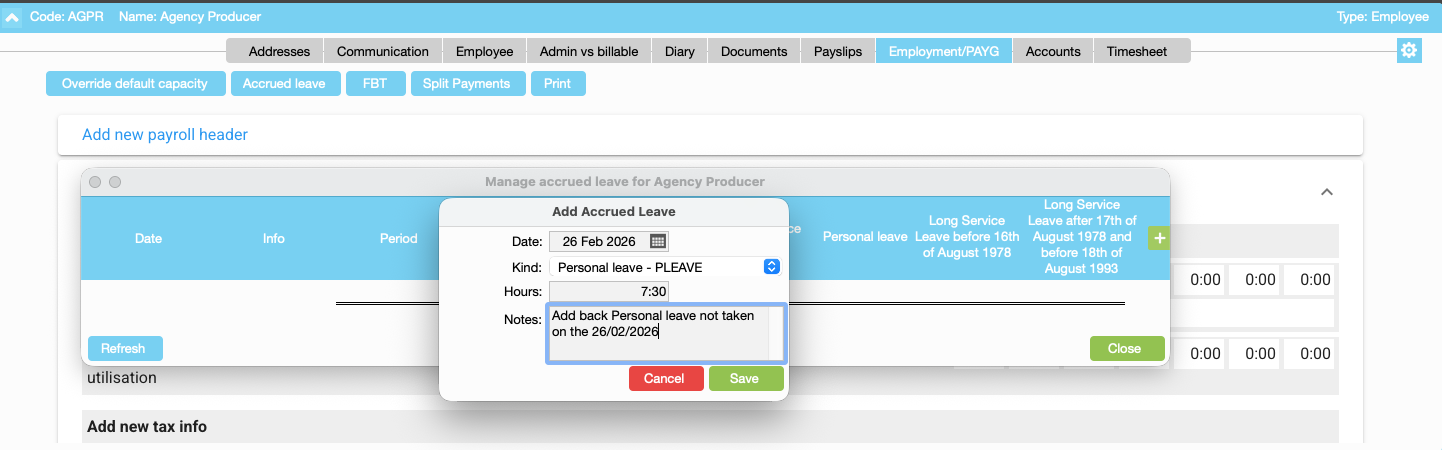
Navigate to: Employee Address Book Record > Employment/PAYG tab > Accrued Leave
To create a leave adjustment
- Select New.
- Enter the Date of the adjustment.
- Choose the Leave Type you want to adjust (for example Annual Leave or Personal Leave).
- Enter the Hours to add to the balance.
- Add a Note (optional) to explain the reason for the adjustment.
- Save
The adjustment will update the employee’s accrued leave balance accordingly.
Organise training or need more help
Please contact support 02 8115 8090 or email support@jobbag.com