
Create Freelancer Timesheets as In-House
Create Freelancer Invoices as Overheads allows Freelancer timesheets to be entered against a client Job as In-House Timesheets, while posting the Freelancer invoice costs to the Profit & Loss.
Before using this process, the relevant Kinds must be mapped to the appropriate Freelancer overhead cost accounts.
Step 1: Update and Map Relevant Kinds
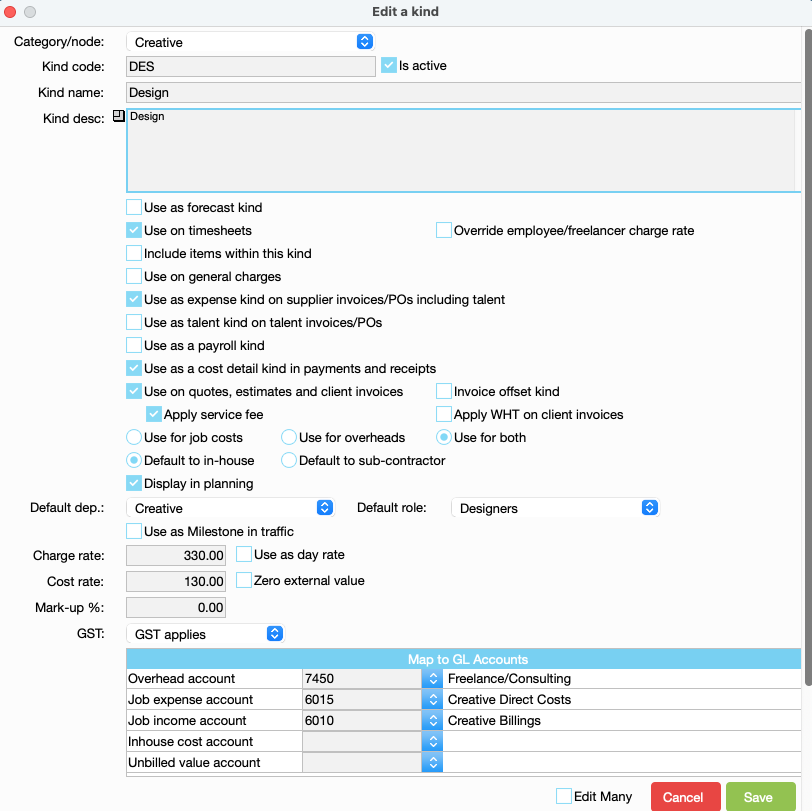
Navigate to:JobBag menu > Kinds > Edit Kind
For each relevant Kind:
- Tick Use for both
- Map the Overhead Account to the appropriate Freelancer overhead cost account
Example:
Design → Freelance Consulting Overhead Account
Step 2: Enable Supplier Invoice Setting
This setting will only apply to timesheets created after it has been enabled.
Any existing timesheets may need to be converted. Refer to Step 3 below.
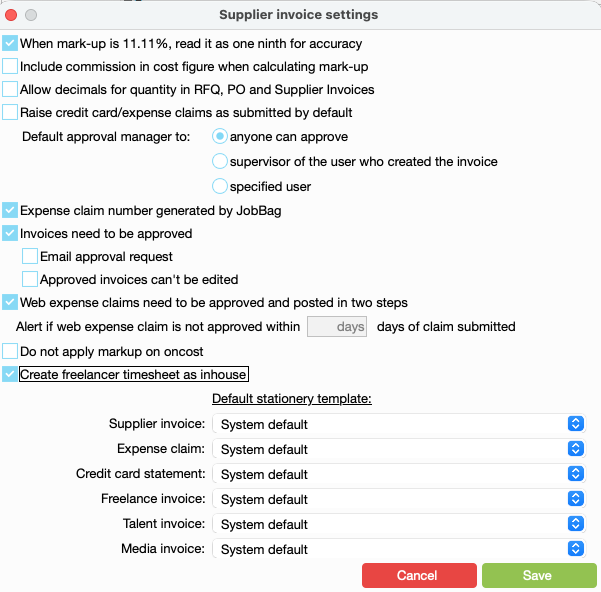
Navigate to:Costing > Supplier Invoices > Settings
Tick: Create Freelancer Timesheets as In-House
Step 3: Convert Existing Timesheets (Optional)
If timesheets were created before the setting was enabled, they may need to be converted.
Navigate to:Costing > Timesheets by Hour
Review and convert any existing Freelancer timesheets that need to use the new process.
Step 4: Process Freelancer Invoice
Process the Freelancer invoice by loading the recorded timesheets.
This process allows you to match the Freelancer invoice against the timesheets entered against the Job and post the costs to the appropriate overhead accounts.
Note: When processing Freelancer supplier invoices, you must use the Load Timesheets option to use the In-House Timesheet feature.
Organise training or need more help
Please contact support 02 8115 8090 or email support@jobbag.com