
How to process a new employee's first payslip
How to Process a New Employee’s First Payslip
A manual payslip must be created for all new employees, regardless of their start date.
Navigation
Go to: Payroll menu > Step 2: Manual Payslip
Information to Enter:
| Field | Description |
|
|---|---|---|
| Employee | Enter the employee’s name. | Bonnie Walker |
| Pay date | Enter the date the payment will be made. | 31/10/2025 |
| Pay period from | This should populate automatically based on the employee’s start date from the employment record. | Employee start date: 13/10/2025 |
| Pay period until | Enter the end date of the current pay cycle. | 31/10/2025 |
| ORD – Ordinary Time Earnings | Update this to reflect the number of hours or days the employee should be paid for in their first month. | 15 days × 8 hours = 120 hours |
Example
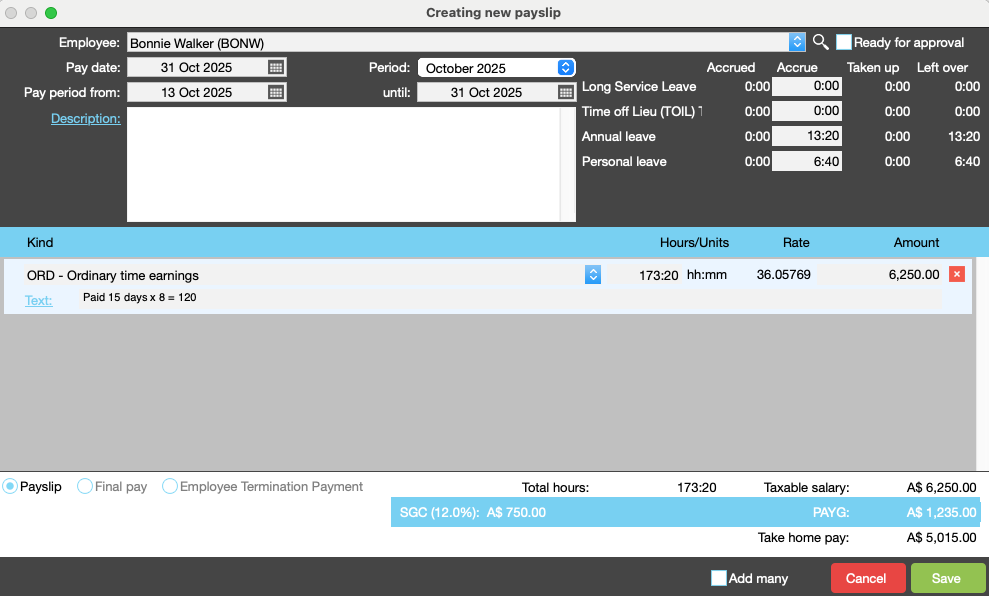
In the example below, the new employee is being paid for 15 days:
15 days × 8 hours = 120 hours
This amount should be entered into the ORD field.
Organise training or need more help
Please contact support 02 8115 8090 or email support@jobbag.com