
Email Templates
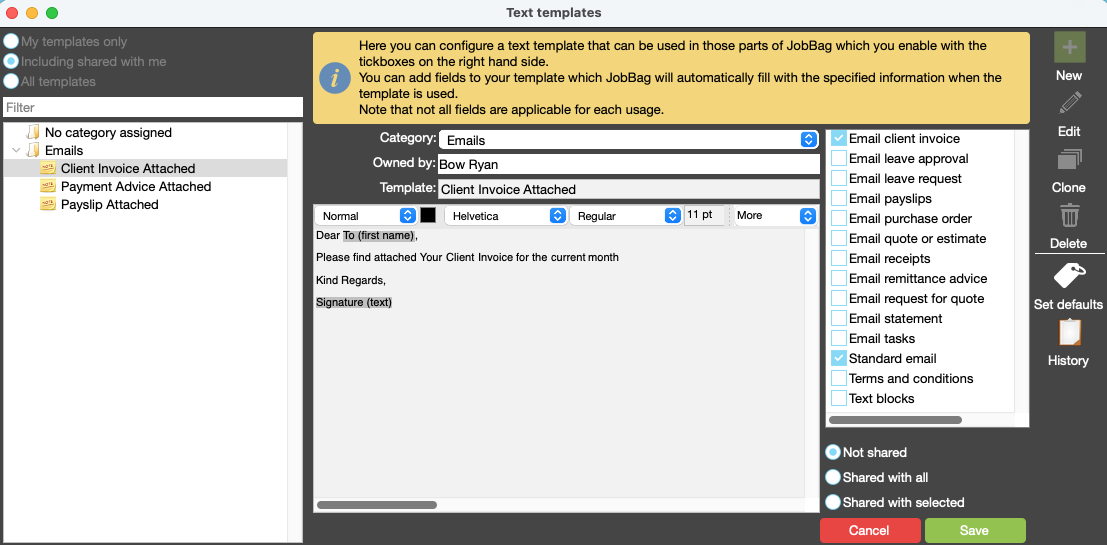
Email Templates - called Text Templates in JobBag - help save time and ensure consistency when sending repeated communications. Instead of typing the same message each time, you can create a template once and reuse it whenever needed.
Navigation
Navigate to: File > Configuration > Stationery > Text Templates > New > New Template
Add new Email/Text Template
Smart Fields
Text Templates can include Smart Fields, which automatically insert relevant information such as names, invoice numbers, job details, or dates. This allows you to personalise messages while still using a standard template.
To add a Smart Field:
- Use the More drop-down list and select the required Smart Field, or
- Right-click in the body of the email and choose the Smart Field you want to insert.
Common Uses
You can create and manage as many Text Templates as needed to suit different communication scenarios.
Common uses include Invoice Attached emails, Payment Advice emails, Task Assigned notifications, and other regular client or team communications.
Organise training or need more help
Please contact support 02 8115 8090 or email support@jobbag.com